Flight has a way of capturing our attention.
A student might find their eyes wandering from their lesson to the bird flying past their classroom window, just as an adult stepping out of the office might pause for a moment to watch the airplane overhead soar through the clouds.
While many people of all ages are delighted by aviation, many young learners today may have little to no experience with aircraft of any size. If you ask a child if they have ever folded a paper airplane, there's a non-zero chance they could say no.
The Academy of Model Aeronautics Education Team recognized that the world's next aviation enthusiast could very well miss out on their passion because of this gap, so the team set out to create a hands-on pathway for students to explore flight at every step of the way.
This has resulted in a project that we are very excited to share the first stage of today: Fold to Flight. Fold to Flight is a free, multi-stage project that is designed to meet learners wherever they may be in their aviation journey. It starts with the simplest model there is: a paper airplane. Fold to Flight steadily builds students' aviation skills, flight knowledge, and confidence as they progress through different disciplines of flight.
Understanding this Resource
Before we get too into the specifics of the Fold to Flight project, we want to emphasize that we want educators to utilize this resource as they see fit. You may notice that we offer suggested timelines, activities, and models, but no one knows your learners like you do. Fold to Flight is designed to be a flexible pathway that you can adjust to meet the needs of your students.
The Fold to Flight pathway is designed to introduce flight concepts to beginner or intermediate pilots in an accessible and inexpensive manner. You are more than free to pick and choose the lessons or disciplines that you see fit and move through the stages as you see fit.
Fold to Flight will have multiple stages that are available for all grade levels from K through 12. As younger students advance through the disciplines, they may shift between a hands-on approach to a more observational approach, but there will still be plenty of learning opportunities available to them. This educational pathway is designed to be highly interactive and engaging for students of all ages at each step.

Fold to Flight includes Next Generation Science Standards for the K-2, 3-5, Middle School, and High School grade bands so that classroom teachers can easily integrate these lessons within their curriculum. This educational pathway will cover the following model flight disciplines:
- Paper Airplane
- Glider
- Free Flight
- Small Indoor Drone
- R/C Airplane
- Large Outdoor Drone
Below, you will see all stages of this project. Each stage will have the lesson plan, a suggested timeline, and the standards and steps for each grade band.
Paper Airplane Stage
An introduction to flight through hands-on building and fun experimentation
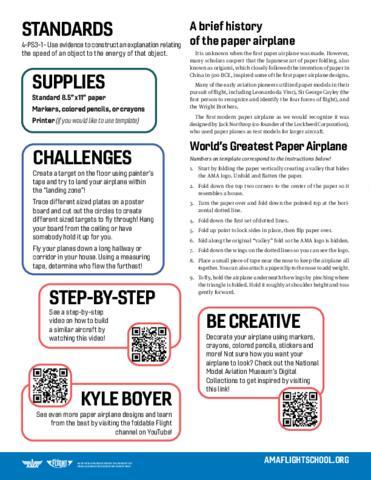
We suggest the AMA Education Team's free Paper Plane Quick Project for this stage.
Applicable NGSS Standards
- K-2 Standards:K-PS2-1, K-2-ETS1-2
- 3-5 Standards: 3-PS2-1 (PS2.A), 3-5 ETS1-3
- MS Standards: MS-PS2-2, MS-ETS1-2
- HS Standards: HS-PS2-1, HS-ETS1-2
Objective:
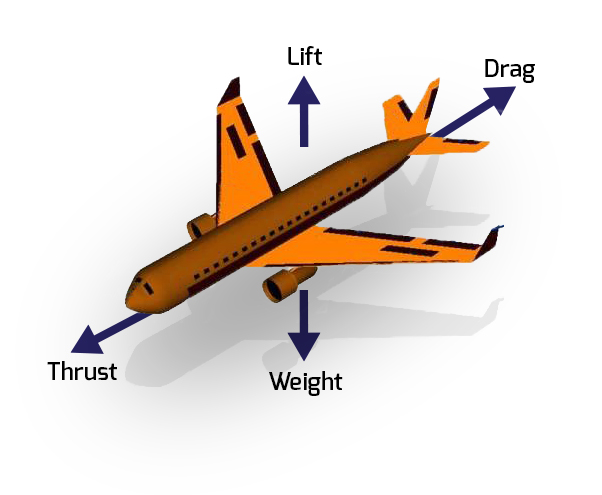
Students will learn about the four fundamental forces that affect flight: lift, weight, thrust, and drag.
Concept Introduction:
-
Lift is the upward force that opposes gravity. It is created by the movement of air over and under the wings.
-
Demonstration: Explain that lift keeps the plane from falling. Demonstrate by holding a paper airplane flat and then tilting the wings slightly to show how changes in shape affect how it rises or glides. Blowing gently over a wing can also illustrate moving air creating lift.
-
-
Weight (Gravity) is the downward force caused by Earth's gravity pulling the aircraft toward the ground.
-
Demonstration: Explain that everything with mass experiences gravity. Drop a small object alongside a paper airplane to show that both are pulled down, while the plane flies because of other forces acting on it.
-
-
Thrust is the forward force that propels the aircraft. It is produced by engines, propellers, or a simple hand launch.
-
Demonstration: Explain that thrust moves the plane through the air. Have students throw a paper airplane gently and then strongly to observe how thrust affects speed and distance.
-
-
Drag is the backward force (air resistance) that opposes thrust and slows the aircraft down.
-
Demonstration: Explain that drag is air pushing against the plane. Compare a tightly folded paper airplane to a loosely folded one or add a paperclip to the nose to show how design changes increase drag and affect flight.
-
Key Learning Points:
-
Students will understand how lift, weight, thrust, and drag interact to make flight possible.
-
Students will begin to observe these forces in action during paper airplane and glider activities.
-
Interactive demonstration and experimentation help students connect each force to observable effects in real time.
Objective:
Students will construct paper airplanes, test their flight performance, make adjustments, and engage in a friendly distance and accuracy challenge to explore the principles of flight.
Classroom Activity:
-
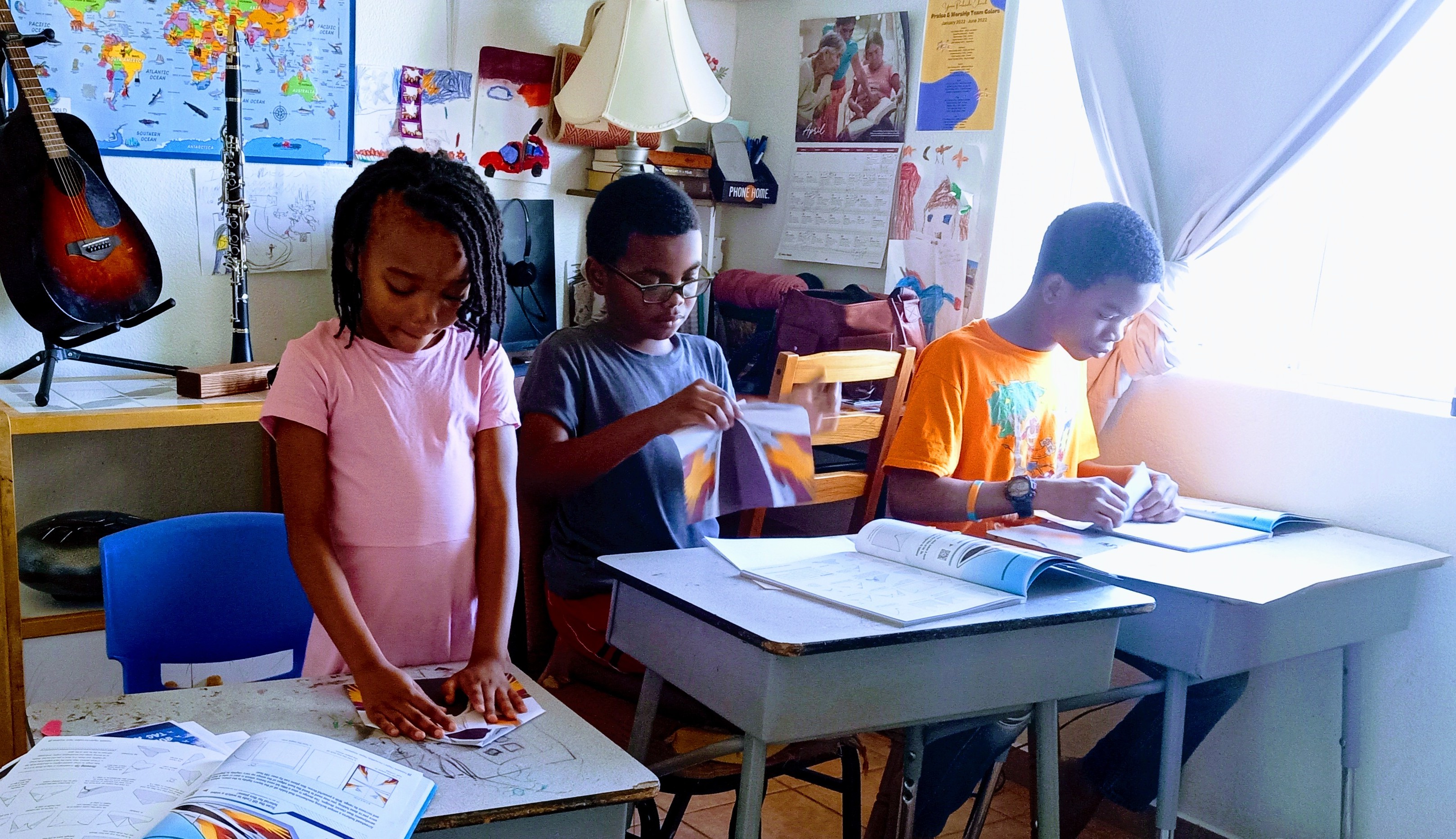
Construction: Students fold their own paper airplanes, experimenting with different designs. Encourage attention to symmetry, wing shape, and folds.
-
Testing and Adjusting: Students fly their planes, observe flight patterns, and make adjustments to improve performance. Discuss how changes affect lift, thrust, drag, and stability.
-
Class Contests:
-
Distance Challenge – See how far students' airplanes can fly.
-
Accuracy Challenge – Aim for a target and test the airplanes' control.
Key Learning Points:
-
How basic design choices affect flight.
-
The four forces of flight (lift, weight, thrust, drag) in action.
-
The value of testing, observing, and iterating to improve results.
-
Friendly competition as a tool for learning and engagement.
Objective:
Students will learn what a payload is, explore real-world examples, and test how adding payloads affects their aircraft’s performance.
Concept Introduction:
A payload is anything an aircraft carries in addition to what it needs to fly.
-
On real airplanes, payloads can be passengers, luggage, or packages.
-
On drones, payloads might be cameras, sensors, or small delivery items.
-
On model airplanes, payloads can be as simple as paperclips, pennies, or small blocks.
Classroom Activity:
-
Introducing Payloads: Begin by explaining that a payload is anything extra an aircraft carries, such as people, packages, or tools. For this activity, paperclips will serve as the payload.
-
Adding Payloads: Students attach one paperclip to their paper airplane and test-fly it. Encourage them to observe changes in distance, stability, or flight path.
-
Increasing Payloads: Have students gradually add more paperclips, testing the plane after each addition. Guide them to notice how extra weight affects performance.
-
Adjusting for Payloads: Challenge students to adapt their throwing technique—changing angle, force, or grip—to see if they can improve flight despite the added payload.
-
Reflection: Facilitate a short discussion where students share observations about how payload affects flight. Connect their experiences to real-world examples like airliners carrying passengers or drones carrying cameras.
Key Learning Points:
-
A payload is any extra item carried by an aircraft.
-
Even small changes in weight affect how an aircraft flies.
-
Pilots and engineers must often adjust how they fly or design their aircraft to account for different payloads.
Objective:
Students will explore how adding payloads (extra weight) affects the distance and accuracy of paper airplanes.
Classroom Activity:
Students will participate in a payload-focused competition with three parts:
-
Distance Challenge: See how far the students' airplane can fly when equipped with payloads.
-
Accuracy Challenge: Aim for a target and test control while carrying payloads.
-
Weight Challenge: Experiment to see how many paperclips students can add to their paper airplanes.
Key Learning Points:
-
Payload is anything an aircraft carries beyond what it needs to fly.
-
Added weight changes how far and how straight an airplane can travel.
-
Pilots and engineers adjust for payloads in real-world aviation, just as students will adjust their throws.
Glider Stage
An introduction to stability and control through simple design principles
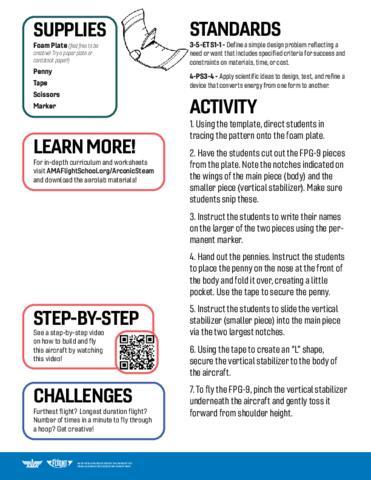
We suggest the AMA Education Team's free FPG-9 (Foam Plate Glider) Quick Project for this stage.
Applicable NGSS Standards
- K-2 Standards:K-PS2-1, K-2-ETS1-2
- 3-5 Standards: 3-PS2-1 (PS2.A), 3-5 ETS1-3
Objective:
Students will review the four forces of flight and be introduced to the concept of free flight models.
Classroom Activity:
-
Review: Teacher briefly reviews lift, weight, thrust, and drag.
-
Introduction: Explain free flight: once an airplane leaves your hand, it flies on its own without controls.
-
Informal Assessment: Students identify which forces they see acting when testing paper airplanes.
-
Preparation: If students will cut out their own FPG-9 templates in the next lesson, distribute or pre-cut materials.
Key Learning Points:
-
The four forces of flight always act on an airplane.
-
A paper airplane or glider is a type of free flight model.
-
Free flight means there’s no control once launched.
Objective:
Students will construct, test, and adjust FPG-9 gliders to explore flight performance.
Classroom Activity:
-
Construction: Students make FPG-9 gliders.
-
Testing: Fly gliders, observe patterns, and test adjustments.
-
Adjusting: Make changes using rudders or elevons to improve control and stability.
-
Competition: Hold a simple distance and accuracy contest with unmodified gliders.
-
Worksheet: Students complete a short worksheet to record flight performance and observations.
Key Learning Points:
-
Small design changes affect balance, stability, and flight distance.
-
Rudders and elevons change direction and pitch.
-
Careful testing and recording observations helps improve flight.
Objective:
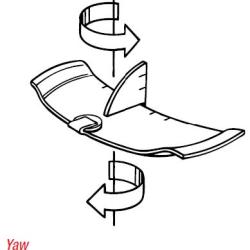
Students will learn about the three axes of flight (yaw, pitch, and roll) and practice using control surfaces to influence them.
Classroom Activity:
-
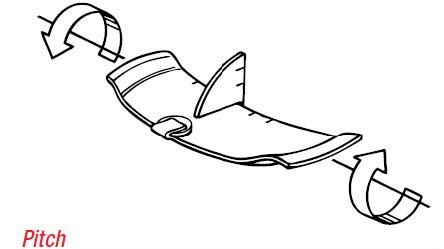
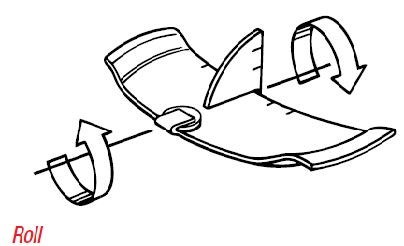
Introduction: Teacher explains yaw (left/right nose movement), pitch (up/down nose movement), and roll (tilting side to side).
-
Demonstration: Show how bending elevons or rudders affects each motion.
-
Testing: Students fly their gliders and observe changes in yaw, pitch, or roll.
-
Adjusting: Students experiment with small changes to control surfaces to practice controlling each axis.
-
These adjustments can be made through the glider's elevators, ailerons, and rudders.
-
Small changes can make a huge difference during this adjustment process, so its important to encourage the students to make small changes one at a time.
-
-
Mini-Challenge: See who can make their glider turn, climb, or bank consistently.
Key Learning Points:
-
Yaw is movement left or right, controlled with rudders.
-
Pitch is movement up or down, controlled with elevons.
-
Roll is tilting side to side, affected by wing surfaces and elevons.
-
Small control changes can greatly affect flight path.
Objective:
Students will explore how payloads affect flight performance and practice adjusting design and technique to adapt.
Classroom Activity:
-
Adding Payloads: Students attach paperclips to gliders as payloads.
-
Testing: Fly payload-equipped gliders, observing changes in flight distance and stability.
-
Adjusting: Modify design or throwing style to balance added weight.
-
Competition: Distance and accuracy contest with payloads.
-
Reflection:
-
Review Discussion – Class discusses what they learned from building, testing, adjusting, and competing.
-
Reflection – Students share how different changes (folds, adjustments, yaw/pitch/roll, payloads) affected their glider flights.
-
Key Learning Points:
-
A payload is anything an aircraft carries in addition to what it needs to fly.
-
Added weight affects stability, distance, and lift.
-
Engineers adjust design and flight techniques to successfully carry payloads.
Free Flight Build Stage
A structured build that offers a more advanced flight performance
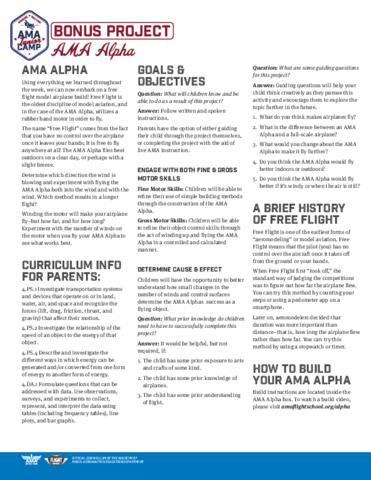
We suggest the AMA Alpha for this stage.
Applicable NGSS Standards
- K-2 Standards:K-PS2-1, K-2-ETS1-2
- 3-5 Standards: 3-PS2-1 (PS2.A), 3-5 ETS1-3
Objective:
Students will review the principles of flight and compare earlier models with their upcoming free flight build.
Classroom Activity:
-
Review: Go over lift, weight, thrust, and drag with the class.
-
Compare: Discuss how their paper airplanes and FPG-9s differ from the upcoming build.
-
Connect: Highlight what students already know and what they will explore further with more advanced gliders.
Key Learning Points:
-
The four forces of flight act on all aircraft, regardless of size or material.
-
Free flight means no external control once the plane is released.
-
Comparing different models helps show how design affects performance.
Objective:
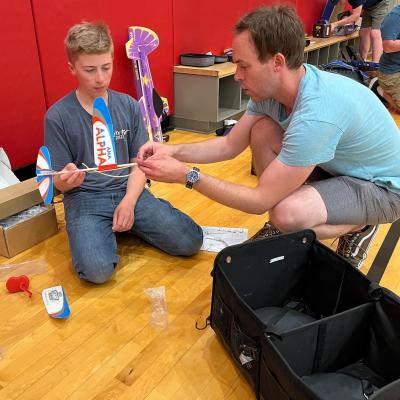
Students will build AMA Alpha or Beta gliders under supervision, reviewing free flight concepts as they work.
Classroom Activity:
-
Review: Recap what free flight means and how it differs from powered or controlled aircraft.
-
Build: Students assemble gliders under teacher supervision.
-
Check: Teachers ensure gliders are balanced and constructed correctly before testing.
Key Learning Points:
-
Free flight gliders must be carefully balanced to fly properly.
-
AMA Alpha/Beta gliders offer a sturdier, more controlled testbed than paper models.
-
Construction precision affects stability and flight performance.
Objective:
Students will test their AMA Alpha/Beta gliders, record flight data, and discuss observations before making adjustments.
Classroom Activity:
-
Test Flight: Students fly their gliders indoors and measure distances and flight times.
-
Observe: Watch carefully for flight patterns, stability issues, and unexpected movements.
-
Discuss: Students share observations with the teacher before making adjustments.
-
Adjust: Make controlled changes to improve flight.
Key Learning Points:
-
Careful observation is the first step in solving flight problems.
-
Adjustments should be based on evidence, not guesswork.
-
Distance and duration give useful data about flight efficiency.
Objective:
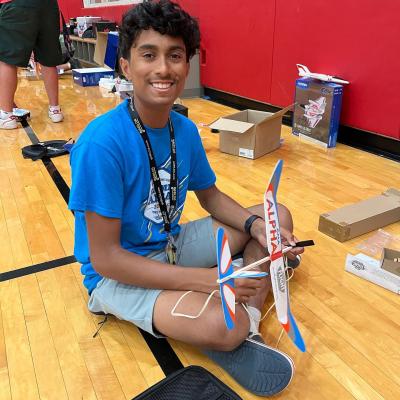
Students will make final adjustments to their gliders and participate in a duration flight challenge.
Classroom Activity:
-
Final Adjustments: Students check and fine-tune gliders one last time.
-
Duration Flight: Conduct a classroom-wide contest to see whose glider stays in the air longest.
-
Reflection: Discuss what techniques or adjustments worked best.
Key Learning Points:
-
Small adjustments can make a big difference in performance.
-
Duration flights emphasize lift and stability over just distance.
-
Repetition is a core part of the engineering and testing process.
Objective:
Students will explore how payloads affect flight, then compete in a final challenge measuring weight carried and flight duration.
Classroom Activity:
-
Introduce: Discuss what a payload is and how added weight affects an aircraft.
-
Experiment: Students add payloads (e.g., paperclips) to their gliders and test flights.
-
Adjust: Modify launch technique or glider setup to adapt to payload weight.
-
Final Competition: Students compete to see whose glider can carry the most weight while staying in the air the longest.
Key Learning Points:
-
Payloads add weight, which impacts lift, drag, and stability.
-
Engineers must balance design and payload capacity.
-
Success depends on both design choices and piloting technique.
Small Indoor Drone Stage
An introduction to multi-rotor flight in a bite-sized model
The TRUST is a free, no-fail that will prepare test takers to plan their flights and how to fly safely within the National Airspace System. All students and educators participating in the Small Indoor Drone stage of Fold to Flight should take the TRUST.
The Academy of Model Aeronautics is an FAA Approved TRUST Administrator. You can access the TRUST here.
This stage of the Fold to Flight Pathway is based on and uses resources from the Know Before You Fly (KBYF) Campaign:
Know Before You Fly is an education campaign organized by the Academy of Model Aeronautics (AMA), the Association for Uncrewed Vehicle Systems International (AUVSI), and the Consumer Technology Association (CTA) in partnership with the Federal Aviation Administration (FAA). Their shared goal is to educate prospective users about the safe and responsible operation of drones.
As excitement and enthusiasm builds around drones, and the regulatory framework continues to take shape, businesses and consumers alike are looking to buy drones for commercial and personal uses. These prospective operators want to fly, and fly safely. But many don’t realize that just because you can easily and quickly buy drones, it doesn’t mean you can fly it anywhere or for any purpose. Know Before You Fly provides prospective users with the information and guidance they need to fly safely and responsibly.
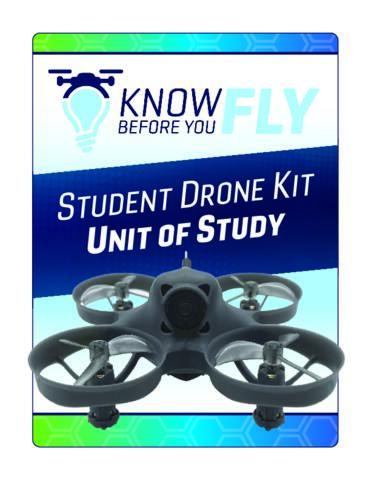
There are two KBYF Units of Study that can be used within your educational setting. Each Unit of Study has its own unique resources and instructions. They are also geared toward different grade bands.
Please note that while the instructions are geared toward a particular model, it is not a requirement to use this drone. You can use and adjust this free educational resource as you see fit within your learning environment.
The educational resources found here are most appropriate for students ages 8-12 but can be adjusted for learners of all ages.


The educational resources found here are most appropriate for students in 9th-12th grade but can be adjusted for all ages.
Radio Control Stage
A hands-on model that lets learners control their very own flight through the skies
The TRUST is a free, no-fail that will prepare test takers to plan their flights and how to fly safely within the National Airspace System. All students and educators participating in the R/C stage of Fold to Flight should take the TRUST.
The Academy of Model Aeronautics is an FAA Approved TRUST Administrator. You can access the TRUST here.
This stage of the project is based off of AMA's Heavy Lift Challenge (a former competition which is now offered as a free resource), which utilizes the Horizon Hobby AeroScout 1.1M.
Applicable NGSS Standards
- K-2 Standards: K-PS2-1 (PS2.A), K-2-ETS1-2
- 3-5 Standards: 3-PS2-1 (PS2.A), 3-5 ETS1-3

Objective:
Students will understand the basic principles of radio control, including how transmitters and receivers communicate, how control surfaces (ailerons, elevator, rudder, and throttle) affect aircraft movement, and how these systems relate to the four forces of flight.
Classroom Activity:
- Demonstration: Show how an R/C transmitter sends signals to the receiver. If possible, display servo movement for each control surface.
- Hands-On:
- Students handle the transmitter (unpowered aircraft) to observe stick movements and surface responses.
- Label diagrams of an R/C trainer (e.g., AeroScout) showing which control surface each stick affects.
- Connection: Discuss how these systems expand on earlier free flight models—students now gain control over pitch, roll, and yaw instead of relying on passive flight.
- Extension (Optional): Use a simulator or video demonstration to visualize how R/C control inputs affect flight in real time.
Key Learning Points:
- R/C systems use radio waves to send control signals from a handheld transmitter to a receiver onboard the model aircraft.
- Each channel on the transmitter corresponds to a specific control surface or function (e.g., throttle, ailerons, rudder, elevator).
- The four primary aircraft movements are:
- Pitch: Up and down movement of the nose, controlled by the elevator.
- Roll: Tilting of the wings, controlled by the ailerons.
- Yaw: Side-to-side movement of the nose, controlled by the rudder.
- Throttle: Power output from the motor, controlling speed and altitude.
- R/C flight combines physics, communication systems, and fine motor skills.
- Safe operation includes performing range checks, verifying controls before flight, and maintaining line-of-sight with the aircraft.
FOR MORE INFORMATION ON LEARNING HOW TO FLY: check out our guide on Soaring Safely: A First-Time Flyer’s Guide to Model Aviation!
Objective:
Students will understand the goals and structure of the Heavy-Lift Challenge, including payload delivery, mission requirements, and constraints.
Classroom Activity:
- Introduction: Present the Heavy-Lift Challenge mission (water payload delivery).
- Team formation: Organize students into teams and assign roles (pilot, builder, payload specialist, recorder).
- Rules walk-through: Review the constraints (stock electronics, allowed modifications, flight pattern, minimum flight time, safety) as described within the challenge's rulebook.
- Discussion / Brainstorm: Students propose preliminary ideas for payload design and how to ensure safe flight with added weight.
Key Learning Points:
- The Heavy-Lift mission requires balancing payload weight and flight performance.
- Constraints (stock parts, structural limits, safety) guide design decisions.
- Clear roles and planning are essential for success in team-based engineering challenges.
Objective:
Students will examine their aircraft and begin designing the payload-carrying or delivery mechanism within the allowed modifications.
Classroom Activity:
- Review model features: Discuss the aircraft’s stock configuration, electronics, structure constraints, and what modifications are allowed.
- Design session: Students sketch a payload mechanism that can hold water, while considering weight, balance, and release method.
- Prototype build (paper or foam): Create small mock-ups or scale models of the payload delivery mechanism (not yet mounted on the plane).
- Peer critique: Teams present designs to each other. Allow classmates to give feedback on balancing, weight, release method.
Key Learning Points:
- Aircraft modifications are limited, and payload design must integrate with existing structure.
- Weight, balance, and secure attachment are critical in payload design.
- Early prototyping and peer feedback help refine ideas before full build.
Objective:
Students will integrate their payload mechanism designs with their aircraft, conduct ground tests, and prepare for flight trials.
Classroom Activity:
- Mounting: Teams attach their payload mechanism prototypes (with dummy weight or small water) to their aircraft.
- Ground testing: Check center of gravity, secure connections, and simulate payload release if possible (on the ground).
- Control check: Perform control surface and motor tests with no payload to ensure baseline performance.
- Dry run: Fly the plane without payload on short flights (safe, low altitude) to confirm handling and baseline performance.
Key Learning Points:
- Pre-flight checks and integration are essential before full flight testing.
- Baseline flight behavior must be understood before adding payload to ensure safety.
- Frequent checks and (necessary) adjustment reduce risk and improve reliability.
Objective:
Students will conduct loaded flights with water payloads, record performance, and iteratively adjust design or flight technique.
Classroom Activity:
- Add payloads: Load the aircraft with water payload.
- Flight trials: Perform an unassisted takeoff, crosswinds and downwind technique, a final approach, and a successful landing, all while carrying payload.
- Data collection: Measure flight time, drop location, stability, and overall mission success.
- Adjustments: Review results and modify payload or flight approach.
- Repeat flights: Fly again under adjusted conditions.
Key Learning Points:
- Payload and added weight directly affect aircraft performance (stalling, lift, drag).
- Flight technique must adapt to changes in balance and aerodynamic load.
- Iterative adjustments and feedback loops are central to success in payload missions.
Objective:
Students will execute a final payload delivery mission and reflect on mission design, performance, and lessons learned.
Classroom Activity:
- Final mission: Each team performs a full payload delivery flight (takeoff, fly mission, deliver water, land) under conditions that mirror the challenge rules.
- Post-mission reflection: Teams share what design choices worked or failed, what adjustments they would make next time.
- Post-flight presentation: Students present flight logs, designs, modifications, and rationale for these adjustments.
Key Learning Points:
- Success in real-world missions depends on both design and execution.
- Real-world constraints require trade-offs and risk management.
- Reflecting on performance, adjustments, and design is critical to engineering growth.
Advanced Outdoor Drone Stage
Put what you have learned into practice through your participation in the UAS4STEM Drone Engineering Challenge!
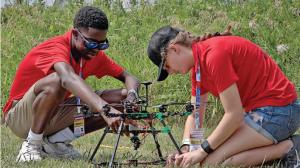
UAS4STEM is not just a drone competition — it’s your launchpad into the world of cutting-edge aerospace innovation!
Student teams design, build, program, and fly their own drones in a mission-driven challenge that develops creativity, coding, and engineering skills.
No experience? No problem.
You’ll learn by doing, growing your skills as you go. Whether you’re just starting out or already flying high, there’s a Beginner and Advanced division to match your experience level. And the best part? You can compete from anywhere in the world!
Build the drone.
Program the systems.
Fly the mission.
Compete globally.
Ready to take off? Reach out to the UAS4STEM Administration team at AMAUAS4STEM@modelaircraft.org to figure out how to get started!
Just like your students' learning journeys, this educational pathway is still growing into something amazing. If you found anything in this educational pathway that you are interested in introducing to your educational setting, please reach out to the Education Team to share your experience and any feedback you may have!


